
Somebody asks where your novel is backed up. You say it's in the app. They ask where the app keeps it, and you find you cannot answer: not to the standard of a folder path you could type from memory, or a date for the last copy that left the building. You have a hundred and twenty thousand words and a vague, warm feeling about the situation.
That is not carelessness. The industry has spent fifteen years making the question feel unnecessary, from both directions at once. Cloud tools said don't worry about files, we've got it. Then a wave of tools said don't worry, your data is on your own machine where it belongs. Both sentences are designed to end the conversation.
Local-first is not safer than the cloud. It is differently unsafe, and the difference is who is responsible.
That's the argument, and I'd rather put it at the top than pretend to arrive at it neutrally. Moving your manuscript out of a datacentre and onto your desk does not reduce risk. It swaps risks you cannot control for risks you can: genuinely better, but only if you do the controlling. Nobody selling local-first software enjoys saying the second half of that sentence out loud.
One question sorts every writing tool you will ever consider
Forget features for a minute. There is a single question that puts any tool on one side of a line, and it is this: if the copy on your machine and the copy on the server disagree, which one is right?
In a cloud tool the server is right. Your device holds a cache: a fast, convenient, disposable rendering of a truth that lives somewhere else and is arbitrated by somebody else. That is not a criticism. It is what makes the collaboration work, and why you can lose a laptop in a taxi and be back at work on a borrowed machine in ten minutes.
In a local-first tool your device is right. The server, if there is one, exists to get your work to your other machines. Kleppmann and colleagues put it precisely in the 2019 essay that gave the term its meaning: they treat the copy on your local device as the primary copy, and "servers still exist, but they hold secondary copies".
Every practical consequence falls out of that asymmetry. Whether the app opens on a train. Whether a lapsed card locks you out of chapter nineteen. Whether the company going bust is an inconvenience or a catastrophe, and whether losing the laptop is, which runs the other way. When comparing tools, a job the choosing guide covers properly, ask it before any question about features, because it predicts most of the answers.
Local-first is a specification, not a vibe
The term has an author and a definition, which is unusual and useful. It comes from an Ink & Switch essay published in April 2019 by Martin Kleppmann, Adam Wiggins, Peter van Hardenberg and Mark McGranaghan, titled (and the subtitle is the argument) "Local-first software: you own your data, in spite of the cloud". It defines local-first software as software that prioritises local storage and local networks over servers in remote datacentres, then, because a definition that broad settles nothing, gives seven ideals to measure a real application against.
- No spinners: your work at your fingertips. Reads and writes hit the local disk; nothing waits on a round trip.
- Your work is not trapped on one device. It syncs to your other machines while staying local on each.
- The network is optional. Full function offline, indefinitely: not a degraded read-only mode for the length of a flight.
- Seamless collaboration with your colleagues. Real-time multi-user editing, with no central server as referee.
- The Long Now. Your work "should continue to be accessible indefinitely, even after the company that produced the software is gone".
- Security and privacy by default. No central database of everybody's documents sitting there being a target.
- You retain ultimate ownership and control. No company can restrict what you do with your own files.
Now the useful part, which is measuring things against it honestly. A typical desktop writing application (files on your disk, works on a plane, opens instantly, exports to formats other software can read) satisfies one, three, five, six and seven. It fails two and four, and those are the hard ones: syncing a document between devices with no central arbiter is a genuinely difficult problem. The essay's own answer is conflict-free replicated data types, which the authors describe as data structures that are multi-user from the ground up, and which almost nobody has shipped in a writing tool.
So five out of seven, and the missing two are the ones you'd most notice. ChapterMuse is in exactly that position: the library sits in a file on your machine, there is no sync, and your second machine is a manual copy or nothing. Most software marketed as local-first is the same. As a marketing word it usually means ideals one, three, six and seven, not the set.
Four things local-first does not mean
It does not mean offline-only: two of the seven ideals require a network, and an app with no sync at all is not more local-first than one that syncs, it is less. It does not mean no server, either: servers hold the secondary copies, run the licence check, deliver the update, answer the AI request. Local-first constrains what the server is for, not whether it exists. It does not mean private, which is a separate property I'll come back to, because that particular conflation is nearly universal and it costs people money.
And it emphatically does not mean backed up. Nothing in the seven ideals is a backup. Ideal five, the Long Now, is about formats and independence from a vendor: about your work still being readable in 2050. It has nothing whatsoever to say about the drive it is readable from still spinning.
A browser can delete your local data without asking you
Here is the failure mode nobody plans for, because almost nobody knows it exists. If your writing tool runs in a browser tab (or in a desktop shell that is a browser engine wearing a coat, which describes a great many) then "stored locally" probably means IndexedDB, and IndexedDB is not a filing cabinet. It is a locker the browser can empty.
Web storage comes in two flavours. Best-effort is the default, and MDN's description is exact: it persists as long as the origin is below its quota, the device has enough storage space, and the user doesn't delete it. Persistent is opt-in, and goes only if the user removes it. The interesting word in the first definition is "enough".
When a disk fills up, browsers evict, least recently used origin first, then the second least recently used, until the pressure is relieved. Two details make this worse than it sounds. Eviction is total, when an origin's data goes, all of it goes at once, not the least important parts. And then the one that should genuinely alarm you:
“When the browser needs to evict best-effort data, it does so without interrupting the user.”
No prompt. No notification. No entry in a log you could find afterwards. You install a game, the drive gets tight, and a novel evaporates in a way that leaves no evidence it was ever there: the application simply opens one morning looking newly installed.
Safari has a second mechanism, and it is not about disk space at all. Under Intelligent Tracking Prevention, WebKit deletes all of a website's script-writable storage after seven days of Safari use without user interaction on the site: IndexedDB, localStorage, session storage, service worker registrations and cache. Web apps added to the home screen keep their own counter and are not the intended target, but intent is not a guarantee, and a writing tool you use in a tab, on holiday, for a fortnight, is squarely inside the rule.
There is an escape hatch, navigator.storage.persist(), and it is weaker than it looks. Chrome does not prompt; it decides on heuristics (the level of site engagement, whether the site has been installed or bookmarked, whether it has notification permission) and silently denies otherwise. Firefox asks the user. So the protection exists, it is invisible, and whether you have it depends on habits nobody told you mattered.
The test is short: find out what your tool writes to, and where. If the answer is a real file at a real path you can copy while the app is shut, you are in reasonable shape. If the answer is "the browser", you are relying on a storage layer whose published contract permits silent deletion, and your backup interval should reflect that.
Each model protects you from the other one's disasters
Say you've cleared that hurdle and your book is a genuine file in a genuine folder. Now the ordinary risks, plainly, because the local-first pitch tends to go quiet here.
Drives fail, usually without warning; SSDs in particular go from fine to unmountable without the courtesy of the clicking noise. Laptops get stolen from cars and cafés and overhead lockers, and the thief has no interest in your manuscript, which does not make it less gone. Ransomware encrypts everything the logged-in user can write to: including, and this is the part people miss, the external drive you left plugged in and the sync folder that will cheerfully propagate the encrypted versions to every other copy within the minute. And the commonest by a distance: you deleted it yourself, or saved the wrong version over the right one at eleven at night and didn't notice for a week.
Cloud tools protect you against every one of those. The manuscript is in a datacentre with redundant storage, offsite by definition, generally with server-side version history that survives your own mistakes. If your house burns down you buy a laptop and log in. That is a real, unglamorous benefit, and any local-first advocate who waves it away is selling you something.
Authoritative copy on your machine
Protects: service shutdown, account suspension, price rises, a lapsed subscription, terms changing under you, an outage on deadline day, and anyone reading your draft uninvited.
Exposes: drive failure, theft, fire, ransomware, your own delete key, browser eviction, and the second device.
Authoritative copy on a server
Protects: drive failure, theft, fire, most ransomware, your own delete key, and getting back to work on a borrowed machine within the hour.
Exposes: the company's balance sheet, an automated moderation decision, a card that expires while you're abroad, an exporter that was never anyone's priority, and the network being down when you have two hours to write.
Neither column is a subset of the other. This is not a case where one option is strictly better and the argument is about price. They are different bets, and the correct move (the one nobody's marketing department will recommend) is to be on both sides of it.
The cloud fails slowly, in writing, on somebody else's schedule
Cloud failures rarely look like failure. They look like an email, and the email is usually polite. In February 2014 Editorially (a collaborative writing platform with a devoted, sophisticated, insufficiently large user base) announced it was closing. Users had until 30 May to get their documents out, and the founders stayed on to keep the export tool working. That is about as decent as a shutdown gets, and it still handed every writer on it an outside deadline to migrate work they had not planned to migrate. Most met it. Some didn't, because in February they were mid-draft and it wasn't urgent yet.
Account lockout is the sharper version, because there is no notice at all. On 27 June 2016 Google deactivated the writer Dennis Cooper's Blogger site and his Gmail account without explanation, taking fourteen years of work with it: including an in-progress novel composed of found GIFs, which existed nowhere else. Two months, considerable press attention and legal pressure later, Google returned the data and explained that it had all come from one complaint about an image posted a decade earlier. The relevant fact is not the ending. It is that for two months his answer to "where is my work" was "inside a company that isn't replying", and the leverage that fixed it was newspapers, not a support ticket.
Then the quieter attrition. A card expires while you're away and the account drops to read-only mid-draft. The price triples on renewal and the alternative is a migration you don't have time for. A feature you built a habit on gets retired. And the one that catches people who did everything right: the export exists, it always has, and it turns out to produce a flat file with your chapter breaks gone and your notes discarded, which is why the Scrivener migration guide spends its first section on opening an export and checking it rather than on making one.
3-2-1 comes from a photographer, and it still works
The rule everyone half-remembers is good and has a real provenance: Peter Krogh, a photographer, in The DAM Book: Digital Asset Management for Photographers (2005): someone keeping decades of irreplaceable files alive on consumer hardware, which is a closer analogue to your situation than anything written for enterprise IT. It travelled. The US Cybersecurity and Infrastructure Security Agency recommends it in its own backup guidance.
- Three copies of anything you care about: the working copy plus two backups.
- Two different kinds of storage, so one class of failure cannot take both.
- One copy offsite, because fire, flood and theft are location-shaped problems.
The reasoning is that failures cluster. Two backups on two partitions of the same disk are one copy in a disguise. Two copies in the same building are one copy as far as a burglar is concerned. Two copies in the same sync folder are one copy the moment ransomware or a bad delete gets in, because the sync will faithfully replicate the damage. Three-two-one is a rule about independence; every part of it breaks a correlation.
Now the honest part: most writers who read that list will do nothing about it, because it describes an infrastructure project rather than a habit. Here is the version I'd defend for a novelist, built on the fact that a whole novel with notes is measured in megabytes. You are not solving a storage problem but a discipline problem, and the discipline has to be cheap enough to survive a bad week.
- Find the path. Not the app's idea of your library: the actual folder on the actual disk, the one you could copy with the app closed. Write it down. Most tools will tell you if you look; in ChapterMuse it's under Settings, in Storage and data.
- Make one automatic offsite copy, then stop thinking about it. A sync service, a backup service, whatever you already pay for. This is the copy that survives the fire, and its job is to require nothing from you. It is also a cloud dependency, which is fine: you're using the cloud for what it's excellent at without letting it hold the authoritative copy.
- Make one manual copy on something disconnected. A cheap USB stick, plugged in for ninety seconds and then unplugged. Unplugged is the whole point: it is the copy ransomware cannot reach and a bad sync cannot overwrite. Weekly while drafting, monthly otherwise.
- Snapshot the manuscript in a dumb format at every milestone. End of a draft, before a structural rewrite, before you accept an editor's changes. A plain export (DOCX, plain text, EPUB, anything with a published spec) dated in the filename and never touched again. This covers the failure the other copies can't: not losing the file, but losing the version, faithfully backed up in its ruined state.
- Email yourself the finished draft. Unserious, unfashionable, and it has saved more novels than any of the above. Offsite, dated, searchable, and it survives you dropping the laptop and the drive down the stairs together.
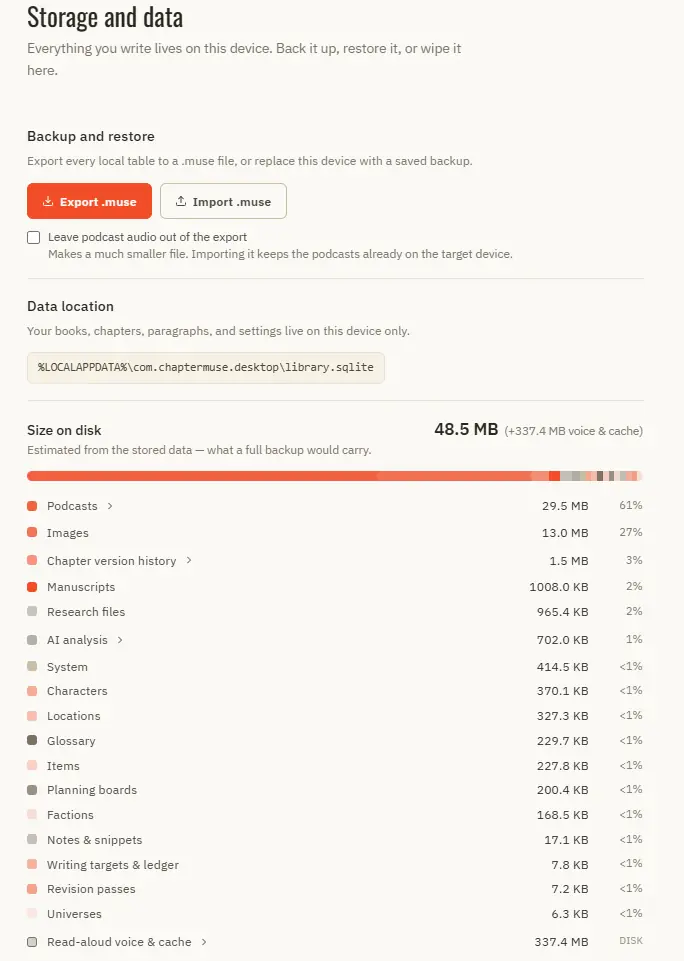
That is three-two-one with the rough edges filed off, plus a dated archive series the live copies don't give you: about two minutes a week once the automatic part is set up. If you only ever do two of the five, do the automatic offsite copy and the milestone export.
A backup you have never restored is a rumour
This is the step everyone skips, and it decides whether the previous section was real or theatre. You do not have a backup. You have a file you believe is a backup, and the belief is untested. The moment you find out whether it was true is, by construction, the worst possible moment.
Backups fail for stupid, undramatic reasons. The sync client had been showing an error for three weeks. The nightly export ran fine and the app had been logged out since March. The archive is complete and needs a version of the application you can no longer download. The zip is fine but the images inside are zero bytes. None of these announce themselves; all are visible within ten minutes of a real restore.
So run the drill once, then twice a year. Restore your most recent backup somewhere that is not your working copy (a different folder, a spare machine, a fresh install) and check four things: the last chapter you wrote is present and complete; the word count is roughly right; the images and research files open rather than merely appearing in a list; and the structure is intact, chapter breaks and notes and whatever metadata you'd mourn.
The drill also tells you how long recovery takes. If getting back to work after a dead laptop is a four-hour operation involving a support ticket and a download you can't find, learn that while you are calm rather than the week a manuscript is due.
Privacy and durability are different axes, and the marketing fuses them
Here is the conflation, in one sentence: "your data never leaves your machine, so it's safe". Two claims are being welded together there, and only one of them is about safety.
Privacy is about who can read your draft. Durability is about whether it exists next year. They vary independently, and all four combinations exist. A local app with no backups is private and fragile. A well-run cloud service with server-side versioning is durable and not private: somebody there can in principle read chapter nine, and a subpoena or a breach can too. An end-to-end encrypted cloud service is both, and is rare. A local app that ships telemetry and sends your paragraphs to a model provider is neither, while being marketed as local-first.
"It's on your machine" answers the privacy question. It says nothing at all about the durability one.
Be clear about which one you actually care about, because writers differ here and the honest answer is often "durability, mostly". If you are writing a memoir involving living people, a book under a name that is not your name, or anything a court might one day be curious about, privacy is a real requirement. If you are writing a fantasy trilogy, the risk that someone at a software company reads chapter nine is not what will ruin your year. Losing chapter nine is.
How to find out what actually leaves your machine
Local-first is not a promise that the application makes no network requests, and no honest one claims otherwise. It updates itself. It checks a licence. It fetches a font. And increasingly it has AI features, which by definition send something somewhere: the question is only what, and when, and whether you asked. You can establish the answer yourself, per feature, in about half an hour.
- Pull the plug and use it properly. Not a thirty-second poke: a full working session offline. Whatever breaks is a network dependency and whatever works is genuinely local, whatever the marketing says either way. One test, and it outperforms every privacy policy ever written.
- Watch the outbound traffic. A per-application firewall makes it concrete: Little Snitch or LuLu on macOS, outbound rules in Windows Defender Firewall, OpenSnitch on Linux. Use each feature in turn and see which ones light up. You want connections you cannot account for, and especially anything that fires while you are simply typing.
- Separate deliberate requests from ambient ones. An AI feature you pressed a button for is a boundary you control, and it should be visible at the moment it happens. Crash reporting, analytics and "usage data to improve the product" are ambient, and the only thing that tells you they exist is the privacy policy: search it for telemetry, diagnostics and third parties.
- Ask what the AI features send, not just whether they send. A check on one paragraph and a pass that ships your whole book for context are wildly different exposures behind identical-looking buttons. In ChapterMuse, Muse and the AI passes make a request only when you ask for one, and the rest of the room does not. Verify that with the firewall rather than taking it from me.
- Check what happens when the licence server is unreachable. Open the app on day thirty of no connection. A local-first tool that bricks itself without a check-in has quietly made the network mandatory.
None of that requires you to be technical. It requires one evening of suspicion about software you're going to hand two years of your life to.
What to actually do
Answer the authority question about the tool you use now: if your copy and theirs disagreed tonight, which wins? Find the path. Then the offsite copy, the disconnected copy, the dated milestone export, and, once, a restore. It is deliberately smaller than the advice you'll find elsewhere, because the failure mode of backup advice is being too large to follow.
And if you take one thing from the argument, take the thing both sides have an interest in not saying. The cloud is not a backup: it is somebody else's authoritative copy, subject to their commercial decisions. Local is not a backup either: it is your authoritative copy, subject to your disk. A backup is a third copy, somewhere neither of those can reach, that you have opened with your own eyes since the last time it mattered.
Sources and further reading
- 01Martin Kleppmann, Adam Wiggins, Peter van Hardenberg & Mark McGranaghan, Local-first software: you own your data, in spite of the cloud (Ink & Switch, April 2019): the canonical definition and the seven ideals used throughout
- 02MDN Web Docs, Storage quotas and eviction criteria: best-effort versus persistent storage, LRU eviction, and eviction happening without interrupting the user
- 03John Wilander, Full Third-Party Cookie Blocking and More (WebKit, March 2020): Safari's seven-day cap on script-writable storage, including IndexedDB
- 04web.dev, Persistent storage: how Chrome decides whether to grant navigator.storage.persist(), and that it decides silently
- 05Peter Krogh, The DAM Book: Digital Asset Management for Photographers (2005): the origin of the 3-2-1 rule, in Krogh's own account
- 06CISA / US-CERT, Data Backup Options: 3-2-1 as baseline public guidance, and why the two media have to be genuinely different
- 07Smashing Magazine, After Editorially: The Search For Alternative Collaborative Online Writing Tools (April 2014): the Editorially shutdown and the 30 May export deadline it imposed on its writers
- 08Artforum, Google Deletes Dennis Cooper's Blog, Erasing Years of Artistic Output (2016): account lockout with no notice; the data was returned two months later after press and legal pressure
Common questions
- What is local-first software?
- A term defined in a 2019 Ink & Switch essay by Kleppmann, Wiggins, van Hardenberg and McGranaghan. It describes software that treats the copy of your data on your own device as the primary copy, with servers holding secondary copies rather than the other way round. The essay sets out seven ideals to measure an application against: instant local reads and writes, working across your devices, an optional network, collaboration, long-term accessibility after the vendor is gone, privacy, and ownership. Most apps that use the label satisfy four or five of them.
- Is my writing safe in the cloud?
- Safe from some things and exposed to others. A well-run cloud service protects you from drive failure, theft, fire, ransomware and your own delete key, and usually keeps server-side version history, which is genuinely more than most writers manage alone. It exposes you to the company shutting down, an automated moderation decision locking your account, price changes, a lapsed payment, and export tooling that may not preserve your structure. The mitigation is the same either way: keep a copy the service cannot reach.
- Can a browser delete my offline app data?
- Yes, and without telling you. Data stored in IndexedDB or localStorage is best-effort by default, and when a device runs low on space browsers evict it least-recently-used origin first, deleting all of that origin's data at once and, in MDN's words, doing so without interrupting the user. Safari adds a separate rule that clears script-writable storage after seven days of browser use with no interaction on the site. An app can request persistent storage, but Chrome grants that on silent heuristics rather than asking. If your writing tool is a web app, back it up on a shorter cycle than you otherwise would.
- How should a novelist back up a manuscript?
- Three copies, two kinds of storage, one offsite: the 3-2-1 rule, which comes from photographer Peter Krogh's The DAM Book (2005). In practice: one automatic sync or backup service you never think about, one manual copy on a drive you unplug afterwards, and a dated export in an open format at every milestone. A novel is a few megabytes, so this is a discipline problem rather than a storage problem. Then restore one of them, twice a year, and check that the last scene you wrote is actually in it.
- Does local-first mean my writing is private?
- No: privacy and durability are separate properties that marketing routinely fuses. A local app can still send telemetry, check a licence, and ship your paragraphs to an AI provider; a cloud app with end-to-end encryption can be more private than either. Test it rather than reading about it: work offline for a full session and see what breaks, then watch outbound connections with a per-application firewall while you use each feature in turn.